GETTING STARTED
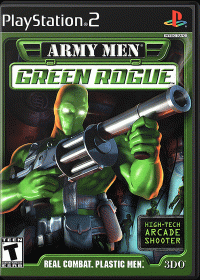
Set up your PlayStation® game console according to its Instruction Manual. Ensure the power is off before inserting or removing a compact disc. Insert the Army Men®: Green Rogue™ disc and close the Disc Cover. Insert game controllers and turn on the PlayStation game console. Follow on-screen instructions to start a game. To load or save information during gameplay, insert a MEMORY CARD with at least 1 free MEMORY CARD block into MEMORY CARD slot 1. Do not insert or remove peripherals or MEMORY CARDS once the power has been turned on.
Top View
Front View
Controller Layout
MAIN MENU
The Main Menu screen appears after the Title screen. Press the directional button to highlight your selection, then press the button to make the selection.
NEW GAME
•
2 PLAYERS: Each player plays as an Omega Soldier simultaneously on one screen. BOOTCAMP
A special environment for learning how to control Omega Soldier. LOAD GAME
Load a previously saved game from your memory card.
OPTIONS
Change the default settings of the game and view previews and credits.
SCOREBOARD
View the top ten 1 player and 2 player scores.
OPTIONS MENU
Press the directional button to highlight a selection, then press the button to make the selection.
DIFFICULTY
Select between three game difficulty settings: Easy, Normal, or Hard.
AUDIO
Adjust the music and sound effects volumes.
CONTROLLER 1
Select one of three different Controller configurations using the directional button. Select Vibration ON or OFF for Player 1's Controller using the directional button.
CONTROLLER 2
Select one of three different Controller configurations using the directional button. Select Vibration ON or OFF for Player 2's Controller using the directional button.
VIEW MOVIES
Take a look at other great games from The 3DO Company! CREDITS
See the names of the people who created this game.
PLAYER NAME ENTRY
You can enter your name (up to 7 characters). Use the directional buttons to select a letter and the directional buttons to change a letter.
Press the button when finished. Your next step is to select your mission.
•
UP DOWN DIRECTIONAL BUTTONS
•
PRESS THE X BUTTON WHEN DONE
SELECT MISSION
Select the level you wish to play by pressing the directional button to scroll through levels. Press the button to confirm your choice.
You may go back and replay any previously completed level. Collect more Medals and achieve a higher score!
Note
All Medals earned will be retained, even if you replay a level, during continuous play, or after saving. Upon replay, scores will only reflect improvement to your previous score.
PAUSE MENU
During gameplay, press the START button to bring up the Pause Menu. Press the directional button to highlight a selection, then press the button to make the selection.
RESUME
Continue playing the game.
AUDIO
Adjust the music and sound effects volumes.
VIBRATION
Use the directional button to choose either ON or OFF.
RESTART
Restarts the current level from the beginning.
QUIT
Quit the game and return to the Main Menu.
BIO-STRIKE
The Bio-Strike ability has three levels of power. Each time a Bio-Strike power-up is collected, the energy blast Omega Soldier emits becomes more powerful. The Bio-Strike can be triggered at any energy level, but will completely deplete all of Omega Soldier's stored energy. You will need to collect more power-ups to begin building it up again. If you collect more than three Bio-Strike power-ups, you can begin storing energy for a second Bio-Strike. You can have a maximum of two fully charged Bio-Strikes. POWER LEVELS
•
LEVEL 2 - EXPANDED ENERGY STRIKE
•
LEVEL 3 - NUCLEAR STRIKE