Ground Hits
Use this attack after knocking down an opponent.
•
A or + B for a short jumping downward attack.
•
+ A or + B for a high jumping downward attack.
Get Up Techniques
When getting up from a knockdown, try pressing and holding the Directional buttons in any of the four directions while rapidly pressing the G button to make your character get up into a roll.
Use an attack or kick button to roll into an attack.
Kick Variations
Try pressing the Controller in different directions at the same time as the K button to execute different kicking attacks.
Explanation of the Game Screen
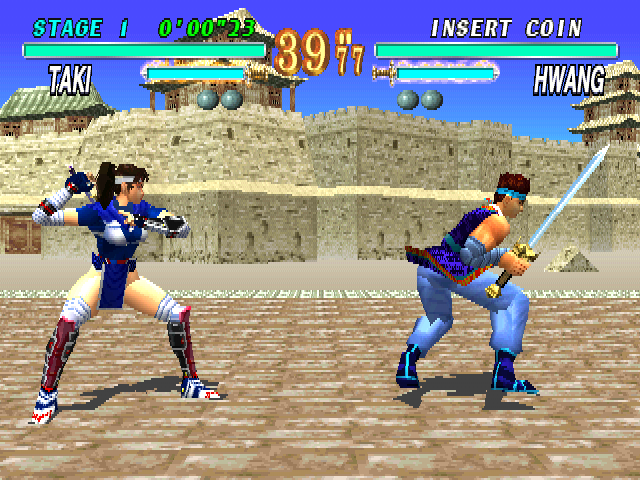
This is what the game screen looks like during play. Depending on the game mode, the number of victories and the number of team members can be indicated around the health meter.
•
1. Health meter for player 1 and name of character in use.
•
2. The remaining time in the round.
•
3. Health meter for player 2 and name of character in use.
•
4. Number of successive fight victories.
•
5. Winning point. This keeps track of the rounds you have won.
•
6. Weapon gauge which shows your weapon power for the Critical Edge Attack.
How to Start the Game
Mode-Select
When you press the START button on the Title screen, the Mode-select screen will be displayed. Use the Directional buttons to select the game mode of your choice, and press the START button or the button to select.
Character-Select and Weapon-Select
Press the LEFT or RIGHT Directional buttons for choosing characters, then press either the , , or button to confirm. Depending on the buttons you choose, the character outfit or colour will change as described below.
If your weapon is obtained in the Edge-master mode, press UP on the Directional buttons or the SELECT button to open the weapon window and select weapons. Point to the weapon that you wish to view with UP and DOWN on the Directional buttons, then press the button to select.
Outfit Selection
•
button - First colour of outfit type 1.
•
A button - Second colour of outfit type 1.
•
X+ button - First colour of outfit type 2.
•
X+ A button - Second colour of outfit type 2.
When the same outfit and colour is selected for both players, the one selected first is given priority. Outfits type 1 and 2 for the first and second player are reversed.
Game Progression and Rules
Matches
When a character is attacked, his or her health meter goes down. A character whose meter has disappeared loses by a knock-out and the opponent is given one win.
At the initial setting, one match has a maximum of three rounds. The player who wins the two rounds by knock-out or decision wins the match.
Time Limit
At the initial setting, the time limit for each round is 40 seconds. If the time runs out and there is still no decisive victor, the character with the greater health amount left on his or her health meter is the winner.
Also, when the remaining health for both characters is exactly the same, a draw will be declared. The time limit can be changed in the Option Mode.
Ring Out
When you or your opponent gets knocked out of the ring, the player that is remaining in the ring wins the current round.
Draw and Sudden Death
The fight is declared a draw if your strength and your opponent's are the same at the time of double knockout, double ringout, or timeout.
In the case of a draw, both fighters win the round. However, when the number of rounds won is the same up to the final round and if both fighters win by a draw again, the fight is declared as a sudden death. In sudden death, the player who attacks first and hits the opponent, is the winner.
Weapon Gauge
The weapon gauge is the small meter under the player's health meter. You can use the Critical-edge special attack when the gauge has flames surrounding it.
Use caution, when you use the Critical-edge or when you guard against your opponent's attack, the gauge will show a decrease. If you try to guard when the gauge shows 0, your weapon will be tossed away. However, the weapon gauge will regain limited energy in the next round, at which time your lost weapon will be restored.
Continuing the Game
After losing to the computer opponent, you can restart the game from the beginning of that match by pressing the START button while the Continue screen is counting down.
Game Modes
Arcade Mode
One player against the computer. First you must choose a character with the LEFT and RIGHT Directional buttons, then select it with the X, O, Δ and buttons as mentioned earlier. Each character has 3 outfits.
In this mode, if you press the START button on player two's Controller, the game against the computer will be interrupted and it will be switched into the 2-player mode. Then the character who wins the match will continue to play against the computer. The game ends when you lose to the computer.
Camera Operation During a Replay
The player who won the fight can enjoy replaying that same fight with different camera angles. You can play it the same way in different modes.
•
Directional buttons - shifting camera locations
Vs. Battle Mode
Two players compete against each other. Refer to the "How to start the game" section
 (Rev 1).png)

 (Rev 1).png)
.png)