GETTING STARTED
Set up your Nintendo GameCube™™ according to the instructions in the instruction manual. Make sure the POWER Button is turned on. When the power indicator lights up, press the OPEN Button and the disc cover will open. Place the Pac-Man Fever ™™ Game Disc on the disc tray with the label facing up. Manually close the disc cover and the game will begin to load. Memory Cards
Insert a Nintendo GameCube™™ Memory Card to load a saved game or create a new Pac-Man Fever game file. Memory Card Check
Before starting Pac-Man Fever, a Nintendo GameCube™™ Memory Card check will occur. If there is no saved Pac-Man Fever data on the Nintendo GameCube™™ Memory Card, then a new save file will be created automatically. If Pac-Man Fever game data already exists on the Nintendo GameCube™™ Memory Card, the saved game will automatically load. Please refer to the Nintendo GameCube instruction booklet (pages 18-20) for directions on how to format and erase Memory Card files. NOTE: You can't save if the Memory Card is not inserted at the beginning.
Main Menu Navigation
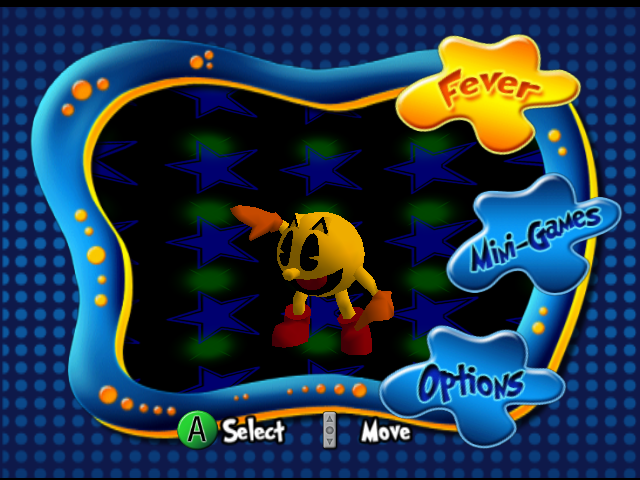
Use the Control Stick or +Control Pad up/down to highlight a menu item and press the A Button. (Any player can make this selection.)
FEVER
Compete in board games to win Redemption Tickets that you can use to buy all the Mini-Games. Boards each have special themes.
Choose to play the one you want in Short, Normal or Long game versions.
MINI-GAME
Play the Pac-Man Fever Mini-Games. In order to play all the Mini-Games, you must win Redemption Tickets in the Fever Games and use them to buy Mini-Games. OPTIONS
•
Press the Control Stick or +Control Pad left/right to change the setting.
•
Press the Control Stick or +Control Pad up/down to select the setting.
Music Mode
Set the music volume.
SFX Mode
Set the sound effects volume.
Credits
View the list of game creators.
JOIN A GAME
After you have selected to play either a Fever Game or Mini-Game from the Main Menu, the Join The Game Screen appears. To join the game, press the A Button.
1. Select your player name or enter a new one.
•
If you already have a name entered, use the Control Stick or +Control Pad up/down to display the name and press the A Button.
•
If you want to enter a new name, press the A Button while the words NEW NAME are displayed in your controller box to open the Name Screen.
•
Use the Control Stick or +Control Pad to highlight a letter and press the A Button to enter the letter.
•
If you change your mind, highlight the BACK ARROW and press the A Button.
•
When you are ready, highlight OK and press the A Button.
2. Choose your character. Press the Control Stick or +Control Pad left/right to select your character. If there are three or less players, remaining characters will be chosen automatically. There are always four characters competing in Pac-Man Fever. Keeping Track Of Your Game Progress
All the stats for your Pac-Man Fever games will be saved in a file with your name. When the Join the Game Screen appears, press the A Button and use the Control Stick or +Control Pad up/down to select your name. Trophies you have won, your current number of Redemption Tickets, and the number of Mini-Games you have purchased will appear.
Remember your color!
Each controller has been assigned its own color. It will always be the color you use in the Mini-Games. Look for your color in the Mini-Games to quickly identify your character, an object you must move, a target or a location where you must place things.
PLAYING THE FEVER GAME
Compete in a board game trying to beat all the other players by advancing to the finish first and by winning Redemption Tickets to buy back the Mini-Games. Select a Game Board Theme and Game Length
Before beginning a game, decide on a board type and game length on the Fever Options Screens.
•
Use the Control Stick or +Control Pad left/right to select MEDIEVAL, SPACE or TROPICAL and press the A Button.
•
Use the Control Stick or +Control Pad up/down to select a SHORT, NORMAL or LONG game and press the A Button. You can see the length of each highlighted game on the game map.
Fever Game Rules
Four contestants compete in the board game to win Redemption Tickets. The first person to reach the final square of the board wins. The winner receives the most Redemption Tickets, the 2nd place player gets half the tickets of the winner, the 3rd place contestant receives half of whatever the 2nd place player won. The last place wins nothing.
PLAYING THE FEVER GAME
Before each move, players compete in a Mini-Game to determine how many squares each player can advance. The winner of the Mini-Game gets to move the farthest.
Players make their moves in order, with Player I always going first. If you land on a square occupied by another contestant, you will automatically be moved forward to the next unoccupied square.
The Fever Game Screen
.png)


_2.png)
_3.png)
.png)



.png)




.png)









.png)
.png)