Getting Started
Insert the Independence Day disc into the Sega Saturn™ console and close the CD door. Insert controller(s) and turn on the Sega Saturn™ game console. After a few moments, the title screen will appear. Press the START button when instructed to do so. The Main Menu will appear, giving you three selections from which to choose: SINGLE PLAYER, MULTIPLAYER and OPTIONS.
Main Menu Navigation
Press the UP or DOWN Directional Buttons on your controller until your desired selection is highlighted. Press [A or C BUTTON ICON] to choose the selection.
The main menu options are:
Main Options Menu
Choosing OPTIONS from the Main Menu will bring up the Main Options Menu. Make your selection using the UP and DOWN Directional Buttons.
•
Load Game: If you have saved a previous game, you can use this option to restore it as explained in the LOAD/SAVE section of this manual.
•
Skill Level: Use the LEFT and RIGHT Directional Buttons to select the desired level of difficulty.
•
Radio, Music and SFX: Use the LEFT and RIGHT Directional Buttons to set the desired volume level for radio chatter, music and sound effects.
Controller Configuration
Press [A or C BUTTON ICON] and use the LEFT and RIGHT Directional Buttons to select one of the following four control configurations:
Press [A or C BUTTON ICON] to choose the configuration and return to the options menu.
Player Name
Use the RIGHT and LEFT Directional Buttons to find and select the desired letter, then press the [A or C BUTTON ICON] button to choose that letter. Choose SPACE to insert a blank space, choose DELETE to delete the previous letter. Choosing CLEAR will clear the name entirely. When done, choose END. Audio and Exit
Use the LEFT and RIGHT Directional Buttons to select Stereo or Mono depending on how you have connected your Saturn to your TV or monitor. Press Start to leave the Main Options Menu and return to the Main Menu. You may now select either Single Player or Multiplayer.
Single Player Mode
Selecting and choosing Single Player from the Main Menu will begin a brief video sequence followed by the Recon Mission Screen. Later missions will first allow you to select your aircraft. To bypass the video sequence and go directly to the Mission Screen, press START.
The window at the bottom of the screen explains your mission objective. Press the LEFT and RIGHT Directional Buttons for a description of your targets, along with descriptions of the various weaponry and aircraft (alien and friendly) which you will encounter during your mission.
Near the top of the screen you can select either SAVE GAME or START by pressing the UP and DOWN Directional Buttons. Press [A or C BUTTON ICON] to choose your selection. Saving games is explained in the LOAD/SAVE section of this manual.
Multiplayer Mode
Selecting and choosing Multiplayer from the Main Menu brings up the following screen options:
Use the UP and DOWN Directional Buttons to select either Head to Head or Network Cable mode. Press [A or C BUTTON ICON] to choose your selection.
Head to Head Options
Head to Head mode allows two players to play against each other on a split-screen. To play in Head to Head mode, you must have two controllers plugged in. Choosing Head to Head on the Multiplayer Menu brings up the Head to Head Options Menu. Make your selection with the UP and DOWN Directional Buttons.
•
Player 1 and Player 2: Press the [A or C BUTTON ICON] button to enter player names and choose controller configuration as previously described.
•
City: Press the LEFT and RIGHT Directional Buttons to select from one of four available cities.
•
Kill Limit: Press the LEFT and RIGHT Directional Buttons to set the number of kills a player must achieve to win a game.
•
Start: Press the START button to leave the Head to Head Options Menu and go to the Plane Selection Screen. Each player may cycle through the available aircraft by pressing the LEFT and RIGHT Directional Buttons. To choose a plane, press [A or C BUTTON ICON].
•
Exit: Press the [A or C BUTTON ICON] button to leave the Head to Head Options Menu and return to the Multiplayer Menu.
Network Mode
To play in Network Mode you must have two separate Sega Saturn™ consoles hooked up to two separate televisions. Simply plug each end of the link cable into the communication port at the back of each console. Once connected, select Network mode and follow the same on-screen procedure as for Head to Head Mode. Press [A or C BUTTON ICON] to return to the Main Menu.
Mission Guidelines
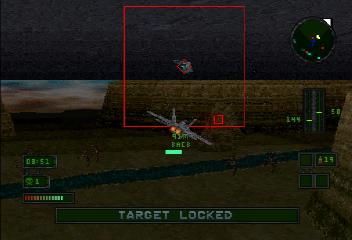
Remember that each mission has an objective which must be carried out before your allotted time expires. Concentrate on the objects that appear white on your radar. The triangular radar pointer will always direct you toward your primary objective.
•
Grand Canyon Mission Objective: On the underside of the City Destroyer are four field generators that provide a defensive shield around the ship and the city perimeter. Your mission is to destroy all four, then take out the primary weapon.
•
Washington Mission Objective: Alien defenses are threatening to destroy the E-3 AWACS. Your mission is to protect them until they can complete their reconnaissance of the City Destroyer, then take out the primary weapon.
•
New York Mission Objective: A collection of Earth-based satellite uplinks are being used by the Aliens to communicate with other City Destroyers. Your mission is to locate and destroy these uplinks, then take out the primary weapon.
Other mission objectives will be


.png)






_1.png)

_1.png)
.png)